A Blog about Make Money Online Tips, Blogging Tips and Blogger Templates, Widgets plus Blogger Hacks.You will also find some stuff about Internet and My Life!

Blog Archive

New Magazine Style Blogger Templates

Hi Guys! Today I came up with the new magazine style blogger templates which will really like by you.These templates are 3 in number and designed by different designers.You can download these templates from below.Don't wait & Grab them!

[NOTE:Upload the Images included in zip folder into your own host]

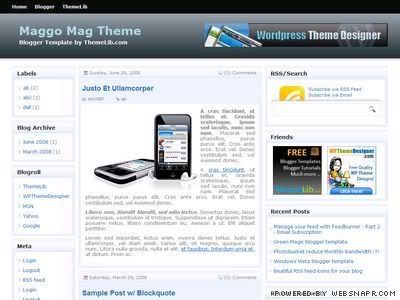
1.Maggo Magazine Blogger Template:


Designed by: Themelib

Maggo magazine blogger template

Features:
  • Magazine Style template
  • XML Template
  • 3 Column Template
  • Fully Widget Ready
  • White Template
  • Adsense Ready


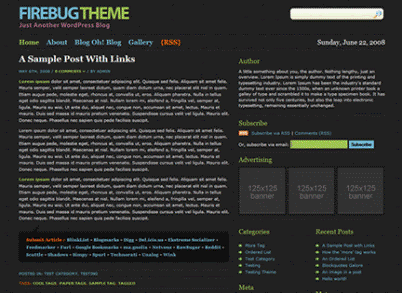
2.Fire Bug Magazine Template:
Designed by: Themelib

Firebug dark blogger template

Features:
  • Magazine Style template
  • XML Template
  • 3 Column Template
  • Fully Widget Ready
  • Black Template
  • Adsense Ready


3.Unik Magazine Template:
Designed by: uniQue


Features:
  • Magazine Style template
  • XML Template
  • 3 Column Template
  • Fully Widget Ready
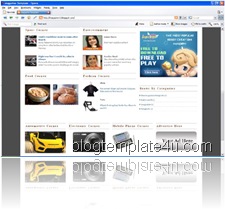
  • White Template
  • Adsense Ready


Samnewz | shamnewz | omorei

Smallest Women in the World!

One of my friend send me some pictures of the World smallest Women via Email.So, I want to share these pictures with you guys.I don't know the name of this women but this smallest women in the world is now 22 years Old!When you see her pics, OMG! You will not believe, She looks only a baby of 1 year! Anyhow She is so cute:)

Now Check out these pictures from below.I hope you will enjoy these pictures very much and will leave a comment to express your interest in these pics;)

(Click the images to Enlarge!)

#1 - World Smallest Women


#2 - World Smallest Women


#3 - World Smallest Women


#4 - World Smallest Women


#5 - World Smallest Women


#6 - World Smallest Women


#7 - World Smallest Women


#8 - World Smallest Women


Samnewz | shamnewz | omorei

New Web 2.0 Blogger Templates

Hi Guys! Here are 3 new & latest cool Web 2.0 Blogspot Xml templates with very cool features.You will really like these templates as the designs of these templates are very professional and awesome.The author of these template is These all templates are three columns and I am sure you all wants 3 Column templates!

You will find all the features of these templates below with its template titles.The Download and Demo links of these templates are also below.So, Don't wait and Grab these templates now.

1.Blogger Template Outono:


Features:
  • 3 Column Template
  • Ajax Tab View Widget
  • White template
  • Cool Header image
  • Widget Ready
  • Top Menu Bar
  • Fully Customizable


2.Blogger Template Borboleta:


Features:
  • 3 Column Template
  • Widget Ready
  • Feed Button after every post
  • Cool Design & Greenish Color
  • Cool Menu bar Design
  • Fully Customizable


3.Blogger Template Agosto:


Features:
  • 3 Column Template
  • 3 Column Footer Section
  • Widget Ready
  • Adsense Ready Template
  • Fully Customizable
  • Top Menu Bar Widget
  • Right Header Ad Banner


Any Comments, problems or Feedbacks? I am here:)

Samnewz | shamnewz | omorei

Back Links Project has been Closed!

You guys may know that I had a project called "Back Links Project" has been closed now.It is because of My Friend Shitu (Visit his blog & thanks him) who informed me in comment:

Just removed it from your blog..

I also removed it since Google may penalize you for back link spamming!!

I just read about Organic links and Natural links..


Yeah! He is right! It will spam Google search engine because Same article has been indexing by search engine.Google may delete our blogs from its search engine.Thats why I closed this project.

I am very thankful to you guys for taking interest in my project.

I have also other cool projects which will surely help you a lot.So, Don't forget to Subscribe my Blog RSS or Subscribe via Email so that you won't miss these projects:) Samnewz | shamnewz | omorei

The POWER of Comments in a Blog!

If you have a blog and You wanna know that Is your blog is liked by your visitors? Then you have to see that Is your blog receives any comments? If your blog receives a descent amount of comments, then It shows that your blog is definitely liked by your visitors.You may think that the use of comments in a blog is just to receive feedbacks from your visitors but You may not know the POWER of comments in a blog.

Now I will talk about the Power of comments in a blog which I hope will be interested for you.So, Go ahead and read out.

The Power of Comments:


Now I will discuss the 3 big powers of Comments in a Blog.Below are the 3 Big Powers of comments with brief explanation.

1.Getting Traffic Via Comments:

When your visitor gives a comment on any of your post, he may use some keywords in his comments.Then when the search engine bots index this post in their search, they also index these comments (You must Remove NoFollow tag from your template).Now, these comments will be the source of traffic to your blog.If your posts receives a huge amount of comments, then you will definetly receive a huge amount of traffic.
Hence, your comments are the big source of Traffic!

2.Getting Popular Via Comments:

Comments are also the sign of popularity of your blog.When your posts receive a huge amount of comments, then your blog is definetly liked by your visitor.Your write really high quality articles.So, Your blog popularity is also based on Comments!


3.Getting Feedbacks Via Comments:

You write a post or article only for your visitors.You use a lot of time to write this post but when you see, your post receive no comments.You will really disappointed.You may think that my Article has no quality.So, Don't be dis hearted, you must write another quality article but told your visitors to give you feedbacks about this article.
May be your Article helps a lot of peoples but they didn't given any feedbacks, So, you must have to concentrate on your visitors to give you feedbacks.Your Comments also work as Feedbacks!

How to increase comments in your blog:

To get the above powers of comments, you must have a descent amount of comments.Then how to increase these comments? Just follow the below rules.

Above are the some rules for increasing comments.

I hope, this article will help you a lot.Your Feedbacks and Comments will be appreciated:)
Samnewz | shamnewz | omorei
Show Ads in Middle (Update)

Previous day I published a hack for Blogger by which you can show any type of Ads including Adsense, Chitika or Yahoo PN in the middle of posts.This hack worked great for many peoples but by implementing this hack, many peoples got problems including me.
The biggest problem occurring by this hack is:

  • Some codes are showing instead of pictures or videos or any third party element in post.
This problem occurs when your image or video are exactly in the middle of post.So, don't worry I have solve this problem.Just follow the below steps to get the solution for your problem.

First Step:

If you have installed the Adsense in Middle hack in your template, then find the below code in your template:

<script type="text/javascript">
var obj0=document.getElementById("aim1<data:post.id/>");
var obj1=document.getElementById("aim2<data:post.id/>");
var s=obj1.innerHTML;
var t=s.substr(0,s.length/2);
var r=t.lastIndexOf(" ");
if(r>0) {obj0.innerHTML=s.substr(0,r);obj1.innerHTML=s.substr(r+1);}
</script>

Now Replace the above code with the below code:

<script type="text/javascript">
var obj0=document.getElementById("aim1<data:post.id/>");
var obj1=document.getElementById("aim2<data:post.id/>");
var s=obj1.innerHTML;
var r=s.search(/\x3C!-- adsense --\x3E/igm);
if(r>0) {obj0.innerHTML=s.substr(0,r);obj1.innerHTML=s.substr(r+16);}
</script>


Second Step:

Now when you post or write a post in blogger you have to Add this <!-- adsense --> code in that area of post where you want Ads to be appear.

Now Ads will appear in the area of posts of your choice.Note that DO NOT add the above tag near the image, video or any type of code in your post.

Any comments or problems? Still here:)

Samnewz | shamnewz | omorei

Show Adsense in Middle of Posts

Do you notice Adsense ads appearing exactly in the middle of Posts in my Blog? Yes? Now you will also eager to know, how to implement these Adsense ads in middle of your blogger posts, Right?
Ok guys! Today I will show you how to implement content around Adsense ads or implement adsense in the middle of posts in Blogger.First you should know the advantages of this hack.
*More clicks will be generated *It will increase your CTR rate *Your earnings will increase

Any how, it is very easy to implement this hack in your blogger template.You have to follow just few easy steps.So, don't wait and follow the below steps to boost your Adsense earnings!

Note that the below hack work only in Beta Blogger.If you wanna it in Classic blogger, then contact me.

Just Follow the Below Steps for this hack:

First you have to login into your Blogger account & Go to Layout>>Edit HTML.
Now check the "Expand Widget Templates" box.Now search for this <data:post.body/> tag in template.

Now replace the above code (Tag) with the code given below:

<div expr:id='"aim1" + data:post.id'></div>

<div style="clear:both; margin:10px 0">

<!-- Your AdSense code here -->

</div>

<div expr:id='"aim2" + data:post.id'>

<data:post.body/>

</div>

<script type="text/javascript">
var obj0=document.getElementById("aim1<data:post.id/>");
var obj1=document.getElementById("aim2<data:post.id/>");
var s=obj1.innerHTML;
var t=s.substr(0,s.length/2);
var r=t.lastIndexOf(" ");
if(r>0) {obj0.innerHTML=s.substr(0,r);obj1.innerHTML=s.substr(r+1);}
</script>


Now replace <!-- Your AdSense code here --> with your desired adsense code.Note that when you add the Adsense code, you must Encode it with Encoder.

Now, when you see your posts, you will see Adsense ads appearing in the middle of your blogger posts.

I think this is the best place in the whole template for Adsense.You will soon notice that 80% of your clicks will genearated from this Area.Good Luck!

Now What I want?

I want just a link to my blog in your Sidebars :p
It will be more better if you Subscribe to my blog for newest Hacks :)

Any Comments, Feedbacks or Problems?Ask Freely!
Samnewz | shamnewz | omorei

Add Yahoo! Buzz Buttons to Blogger

Another Rival Yahoo! buzz has been entered in the race of Digg, Delicious and Stumble upon.I think it will become most Popular (Currently popular) from other social bookmarking sites.Before, blogger were searching for "How to Add Digg button to blogger?", Now they will search for Yahoo! Buzz buttons.Any how our main topic is to Adding Yahoo! Buzz button to blogger.

It is very easy to add Yahoo! Buzz button to blogger templates.Just Grab Yahoo! Buzz Buttons and select your button of your choice.Yahoo! Buzz has got different varities of buttons which also includes buttons with counters.You can see one of button in my blog below posts title.

Now just follow the 2 steps given below to add Yahoo! Buzz button to your blogger template.

1st Step:

Select a button of your choice and copy its code.It will look like this:

<script type="text/javascript" src="http://d.yimg.com/ds/badge2.js" badgetype="text-votes">ARTICLEURL</script>

Now replace the ARTICLEURL with this <data:post.url/> tag.Now your code will look like this:

<script type="text/javascript" src="http://d.yimg.com/ds/badge2.js" badgetype="text-votes"><data:post.url/></script>

2nd Step:

Now in this step, we will implement this button in template in the places of your choice.
First search for this <p><data:post.body/></p> in your template.

If you wanna appear the button in the beginning of the post, paste the button code before the above tag.It will look like this:

<script type="text/javascript" src="http://d.yimg.com/ds/badge2.js" badgetype="text-votes"><data:post.url/></script>
<p><data:post.body/></p>

If you wanna appear the button in the end of the post, paste the button code after the above tag.It will look like this:

<p><data:post.body/></p>
<script type="text/javascript" src="http://d.yimg.com/ds/badge2.js" badgetype="text-votes"><data:post.url/></script>

Now preview your template,If there is no problem then save your template & you are done.

Any Comments or Problems? I m here for this:)
Samnewz | shamnewz | omorei

U Comment I Follow!

Hi Guys! Now I have removed the "No Follow" tag from my blog and now it is "DoFollow"blog! Now you can get free back links from Page Rank 5 Blog! Just comment on and you will get free back links.Your links will be indexed by three major search engines that are Google, Yahoo & Live Search.But note guys that please do not "Spam".I as well as Search engines also hate spam.If you spam, I will delete your comments!
Anyhow, If you also wanna Remove No-Follow tag from your Blogger blog, Just follow the steps below.

How to Remove nofollow Tag from your Blog:

It is very easy to remove nofollow tag from your blog and make your blog Do Follow.Just follow the given steps below.

  • Login into your Blogger account
  • Go to Layout>>Edit HTML
  • Now search (In Firefox, use Ctrl+F for quick search) for the tag rel='nofollow'
  • You will find this tag in two places, that are:
  1. <a expr:href='data:backlink.url' rel='nofollow'><data:backlink.title/></a>
  2. <a expr:href='data:comment.authorUrl' rel='nofollow'><data:comment.author/></a>
  • Now Remove the rel='nofollow' tag from both of the codes.
  • Save your template & you are done!
Your visitors must know about your blog that your blog has DoFollow movement.For this you may wanna put a "U Comment I Follow" badge in your side bar of your blog.Below is the code of the badge.Copy all the code below and paste it in your blog.You can edit its CSS to get the appearance as you wish.

U COMMENT

I FOLLOW


Any comments, questions or problems? I m here:) Samnewz | shamnewz | omorei

Page Navigation Hack for Blogger

As we see in blogger, there is no page navigation feature as it has been more requested feature for blogger.Any how now, you don't need to worry.Today I brought the page navigation hack for blogger.This hack is originally by Muhammad Rias and then modified by Amanda.I will now explain this hack very simply for you, so that you implement it easily with no problems.You can see the sample screenshot of this page navigation hack below:

Your page navigation widget will look as you see in above picture.You can change the appearance of this widget which I am explaining in this article.So, Go ahead and read fully this Article to implement this hack in your Blogger Blog.

1.Adding CSS Code in your Template:

Below is the code you have to add for CSS Styling of the widget.You can modify this code to change the appearance of the Page Navigation widget.
Copy all the code below and paste it just before </b:skin> ending tag in your template.

.showpageArea a {
text-decoration:underline;
}
.showpageNum a {
text-decoration:none;
border: 1px solid #ccc;
margin:0 3px;
padding:3px;
}
.showpageNum a:hover {
border: 1px solid #ccc;
background-color:#ccc;
}
.showpagePoint {
color:#333;
text-decoration:none;
border: 1px solid #ccc;
background: #ccc;
margin:0 3px;
padding:3px;
}
.showpageOf {
text-decoration:none;
padding:3px;
margin: 0 3px 0 0;
}
.showpage a {
text-decoration:none;
border: 1px solid #ccc;
padding:3px;
}
.showpage a:hover {
text-decoration:none;
}
.showpageNum a:link,.showpage a:link {
text-decoration:none;
color:#333;
}


If you know HTML, then you can modify the above code to change the appearance of widget as you wish.

2.Adding Javascript Code below Posts:

In this step, you have to add code to replace the existing Home, Older/Newer posts links.To do this, Go to Layout>>Edit HTML.Do not click "expand widget templates" box.Now find this section of code or relevant to this code in your Template.

<b:section class='main' id='main' showaddelement='yes'> <b:widget id='Blog1' locked='false' title='Blog Posts' type='Blog'/> </b:section>


After finding the above code, Immediately add the below code after </b:section> ending tag.

&lt;script type=&quot;text/javascript&quot;&gt;

function showpageCount(json) {
var thisUrl = location.href;
var htmlMap = new Array();
var isFirstPage = thisUrl.substring(thisUrl.length-5,thisUrl.length)==&quot;.com/&quot;;
var isLablePage = thisUrl.indexOf(&quot;/search/label/&quot;)!=-1;
var isPage = thisUrl.indexOf(&quot;/search?updated&quot;)!=-1;
var thisLable = isLablePage ? thisUrl.substr(thisUrl.indexOf(&quot;/search/label/&quot;)+14,thisUrl.length) : &quot;&quot;;
thisLable = thisLable.indexOf(&quot;?&quot;)!=-1 ? thisLable.substr(0,thisLable.indexOf(&quot;?&quot;)) : thisLable;
var thisNum = 1;
var postNum=1;
var itemCount = 0;
var fFlag = 0;
var eFlag = 0;
var html= &#39;&#39;;
var upPageHtml =&#39;&#39;;
var downPageHtml =&#39;&#39;;

var pageCount = 5;
var displayPageNum = 5;
var upPageWord = &#39;Previous&#39;;
var downPageWord = &#39;Next&#39;;


var labelHtml = &#39;&lt;span class=&quot;showpageNum&quot;&gt;&lt;a href=&quot;/search/label/&#39;+thisLable+&#39;?&amp;max-results=&#39;+pageCount+&#39;&quot;&gt;&#39;;

for(var i=0, post; post = json.feed.entry[i]; i++) {
var timestamp = post.published.$t.substr(0,10);
var title = post.title.$t;
if(isLablePage){
if(title!=&#39;&#39;){
if(post.category){
for(var c=0, post_category; post_category = post.category[c]; c++) {
if(encodeURIComponent(post_category.term)==thisLable){
if(itemCount==0 || (itemCount % pageCount ==(pageCount-1))){
if(thisUrl.indexOf(timestamp)!=-1 ){
thisNum = postNum;
}

postNum++;
htmlMap[htmlMap.length] = &#39;/search/label/&#39;+thisLable+&#39;?updated-max=&#39;+timestamp+&#39;T00%3A00%3A00%2B08%3A00&amp;max-results=&#39;+pageCount;
}
}
}
}//end if(post.category){

itemCount++;
}

}else{
if(title!=&#39;&#39;){
if(itemCount==0 || (itemCount % pageCount ==(pageCount-1))){
if(thisUrl.indexOf(timestamp)!=-1 ){
thisNum = postNum;
}

if(title!=&#39;&#39;) postNum++;
htmlMap[htmlMap.length] = &#39;/search?updated-max=&#39;+timestamp+&#39;T00%3A00%3A00%2B08%3A00&amp;max-results=&#39;+pageCount;
}
}
itemCount++;
}
}

for(var p =0;p&lt; htmlMap.length;p++){
if(p&gt;=(thisNum-displayPageNum-1) &amp;&amp; p&lt;(thisNum+displayPageNum)){
if(fFlag ==0 &amp;&amp; p == thisNum-2){
if(thisNum==2){
if(isLablePage){
upPageHtml = labelHtml + upPageWord +&#39;&lt;/a&gt;&lt;/span&gt;&#39;;
}else{
upPageHtml = &#39;&lt;span class=&quot;showpage&quot;&gt;&lt;a href=&quot;/&quot;&gt;&#39;+ upPageWord +&#39;&lt;/a&gt;&lt;/span&gt;&#39;;
}
}else{
upPageHtml = &#39;&lt;span class=&quot;showpage&quot;&gt;&lt;a href=&quot;&#39;+htmlMap[p]+&#39;&quot;&gt;&#39;+ upPageWord +&#39;&lt;/a&gt;&lt;/span&gt;&#39;;
}

fFlag++;
}

if(p==(thisNum-1)){
html += &#39;&lt;span class=&quot;showpagePoint&quot;&gt;&#39;+thisNum+&#39;&lt;/span&gt;&#39;;
}else{
if(p==0){
if(isLablePage){
html = labelHtml+&#39;1&lt;/a&gt;&lt;/span&gt;&#39;;
}else{
html += &#39;&lt;span class=&quot;showpageNum&quot;&gt;&lt;a href=&quot;/&quot;&gt;1&lt;/a&gt;&lt;/span&gt;&#39;;
}
}else{
html += &#39;&lt;span class=&quot;showpageNum&quot;&gt;&lt;a href=&quot;&#39;+htmlMap[p]+&#39;&quot;&gt;&#39;+ (p+1) +&#39;&lt;/a&gt;&lt;/span&gt;&#39;;
}
}

if(eFlag ==0 &amp;&amp; p == thisNum){
downPageHtml = &#39;&lt;span class=&quot;showpage&quot;&gt; &lt;a href=&quot;&#39;+htmlMap[p]+&#39;&quot;&gt;&#39;+ downPageWord +&#39;&lt;/a&gt;&lt;/span&gt;&#39;;
eFlag++;
}
}//end if(p&gt;=(thisNum-displayPageNum-1) &amp;&amp; p&lt;(thisNum+displayPageNum)){
}//end for(var p =0;p&lt; htmlMap.length;p++){

if(thisNum&gt;1){
if(!isLablePage){
html = &#39;&#39;+upPageHtml+&#39; &#39;+html +&#39; &#39;;
}else{
html = &#39;&#39;+upPageHtml+&#39; &#39;+html +&#39; &#39;;
}
}

html = &#39;&lt;div class=&quot;showpageArea&quot;&gt;&lt;span style=&quot;COLOR: #000;&quot; class=&quot;showpageOf&quot;&gt; Pages (&#39;+(postNum-1)+&#39;)&lt;/span&gt;&#39;+html;

if(thisNum&lt;(postNum-1)){
html += downPageHtml;

}

if(postNum==1) postNum++;
html += &#39;&lt;/div&gt;&#39;;

if(isPage || isFirstPage || isLablePage){
var pageArea = document.getElementsByName(&quot;pageArea&quot;);
var blogPager = document.getElementById(&quot;blog-pager&quot;);

if(postNum &lt;= 2){
html =&#39;&#39;;
}

for(var p =0;p&lt; pageArea.length;p++){
pageArea[p].innerHTML = html;
}

if(pageArea&amp;&amp;pageArea.length&gt;0){
html =&#39;&#39;;
}

if(blogPager){
blogPager.innerHTML = html;
}
}

}
&lt;/script&gt;

&lt;script src=&quot;/feeds/posts/summary?alt=json-in-script&amp;callback=showpageCount&amp;max-results=99999&quot;; type=&quot;text/javascript&quot;&gt;&lt;/script&gt;


Now preview your template and ensure that there is no Code errors in your template.You will not see the hack while previewing.Preview is just for ensuring that you are going right till this step.As you see I "Bold Red" figures in above code.That is:

1.var pageCount = 5; You can change this figure to change the number of posts showing in page when you navigate.

2.var displayPageNum = 5; You can change this figure to change the number of links to be shown.i.e 1-2-3-4-5 beneath the posts.

Now Save your template and thats it.Now you will see Page Navigation hack alive in your blog.

If you have any comments or problems, you can ask freely:)
Samnewz | shamnewz | omorei

Cool Clocks Widgets for your Blog

Below is the collection of some cool Analog Clocks widget for your blog.If you have a personal blog, you must have this widget.Below clocks are of different designs which will hopely suit your blog design.So, don't wait and Grab these Clocks for your blog.If you like these clocks, SAY iT!
To install, Just copy the code below after each clock & paste it in page element.These clocks will look better in sidebars.


Samnewz | shamnewz | omorei

New Xml Blogspot Template:Butterfly

Waiting for new Blogspot Theme? Here is the new Vector 3 Column Blogger Template converted from Wordpress to Blogger by Kranthi.I like the vector design of header of this template.As it is a vector design template, you will surely feel the hard work of the designer.You will find the Screenshot of this template below as well as its features and Demo & Download links.


Features:
  • Xml Blogger Template
  • 3 Column Template
  • Left 2 Sidebars
  • Vector Header Design
  • Cool Feedburner Icon
  • Inbuilt Search Engine
  • Best for Personal Blog
Installation Instructions:
Just follow the Steps below:
  1. Download this template from below.
  2. Sign in into Blogger.
  3. Got to Layout>>Edit HTML.
  4. Upload the template via Upload button.
  5. Find the code below & Replace the Green URL with your desired Feedburner URL.
    <div align='right'><a href='http://YOUR-FEEDBURNER-URL.COM'><img align='top' alt='' src='http://myblogtalk.com/bloggertemplates/butterfly/images/spacer.gif' style='width:150px; height:103px'/></a></div>
  6. Save your template & thats it!

If you have any comments, questions or problems in installing this template, Ask freely:)
Samnewz | shamnewz | omorei

I'm Back!!

Hi Guys! I was missing you Guys very much.As you see I am not here for last 20 days.This is because of some Special & Important works of mine.Now I am back with a big changes to Techodia.
As you see before that in Techodia, you was finding stuff about Music, Games, Technology, Blogger, etc.But now I totally changed the idea of Techodia.
You can see the slogan below the Techodia title in logo "Make Money Online & Blogging Tips".This means that now this blog is totally about Money Making, Blogger Templates, widgets & Hacks and Blogging Tips.You will also find some funny stuff, Cyberworld news or About My life.

Why I Changed the Idea of Techodia?

You will think that why I changed the theme of Techodia?It is because of totally singleness of me.I am alone and a Student.I cannot update my blog with this much stuff regularly.It requires so much time.
Any how you will now find great Pro Blogging tips, Cool Blogger templates, Widgets & Hacks and Fantastic Money Making tips.I am sure you will really like this change.
I have also very cool & beneficial projects after BLP Project, which will be soon alive in Techodia.
So don't wait & Subscribe to my My Feeds that you won't miss my Stuff. Samnewz | shamnewz | omorei

Recent Posts

Design by araba-cı | MoneyGenerator Blogger Template by GosuBlogger